
Practitioner resource
What to Do Before and After a Key Employee Leaves
November 1, 2026
(212) 561-586024/7: (800) 868-8189
An employee's departure can create an immediate conflict between business continuity, access control and evidence preservation. A routine reset or account cleanup may remove the material needed to explain disputed file movement. At the same time, leaving unnecessary access active can expose the organization to further harm. This guide organizes those decisions around an authorized scope, preserved sources and findings that distinguish observed activity from suspicion.
GDF practitioners work alongside legal counsel, internal auditors and corporate IT security teams. Counsel determines the legal basis for access, employment and privacy boundaries, any trade secret claim and the requirements for court relief. The technical record can support those decisions. A USB connection, downloaded file or matching code fragment does not by itself establish theft, intent or legal liability.
1. Open a Controlled Triage Record Before Offboarding Proceeds
Name the directing lawyer, HR contact, IT security lead and person responsible for equipment custody. Record the departure date, last authorized access, reported concern and exact facts already known. Separate a witnessed event from an alert, an employee report or an inference. Identify any competing requirement to disable access immediately and preserve the reason for the decision. A coordinated record reduces the risk that one team preserves a laptop while another deletes the associated account or mobile backup.
Ask the business owner to identify the specific information at issue and its business significance. Record relevant projects, repositories, client materials, design files, pricing records or other claimed confidential material, with the access restrictions that actually existed. Avoid treating an entire home directory or repository as a legally established trade secret. Counsel needs the underlying business facts and protection measures, not a technical label that assumes the claim is already proved.
2. Stop Routine Reuse Without Leaving the Organization Exposed
Place relevant company equipment into controlled custody before a reset, operating system installation, repair or reassignment. Record the asset identifier, assigned user, visible condition, power state and the person receiving it. Preserve available account and security records while an authorized lead plans access restrictions. Where immediate containment is necessary, perform it and document the reason, time and effect. Evidence preservation should inform containment rather than become an excuse to leave harmful access available.
Do not ask a manager to browse the employee's folders, connect a recovered USB device to an ordinary workstation or forward a collection of messages as the only record. Those actions can change metadata, introduce unrelated activity and strip context. Give the examiner the original source under a documented transfer, and keep any earlier informal handling in the chronology. Acknowledging that handling is more useful than implying the source remained untouched.
3. Preserve Laptops and Drives Under a Device Specific Plan
Identify internal storage, removable media, encryption, attached devices and any active session that may affect acquisition. An examiner should choose an appropriate method for the operating system, storage design, encryption state and authorized scope. A full image may be appropriate in one matter; a controlled logical collection may be justified in another. Record the choice and the limits rather than using the term forensic image for every copy. Live collection can change the source, and shutdown can remove volatile information, so document the tradeoff. [S8]
Before equipment leaves IT, retain the asset record, relevant endpoint alerts, device management events and records of administrator actions already taken. Preserve lawful access to necessary recovery material through the organization's approved secure process. Do not place passwords or recovery keys into an ordinary intake message. A preserved drive without a lawful means of accessing its encryption may delay the entire engagement.
4. Treat USB Artifacts as a Connection Record That Needs Corroboration
Where available, collect relevant Windows device recognition records, registry artifacts, installation logs and endpoint telemetry. Record device identifiers and the user and system context in which they appear. Microsoft's description of Event 6416 concerns recognition of an external device; it is not a list of files copied to that device. Correlate any such record with independent file activity, source documents, removable media content or other supported observations before asserting a transfer. The event may be absent if the relevant auditing or retained history is unavailable. [S10]
The examination should ask whether a device was connected, whether relevant files were accessed or staged, and whether there is evidence of a destination copy. Those are separate propositions. Shared workstations, automated processes and ordinary job duties may explain some activity. A report should identify those alternatives and explain which sources support or limit the conclusion. The absence of a removable drive does not establish that no data left, and its presence does not establish what it contained.
5. Preserve Cloud Sync and Sharing Records Beyond the Endpoint
Identify the organization's file platforms, sanctioned synchronization tools and any known external sharing paths. Preserve available activity records, file identifiers, permissions, export parameters and relevant account history. Microsoft documents distinct actions for file access, downloads, synchronization and sharing. An action recorded against an account must be interpreted in its service and client context; automated synchronization and authorized collaboration can produce activity that differs from deliberate disclosure. Preserve the underlying records rather than relying on a screenshot of an alert summary. [S11]
Compare cloud observations with the endpoint and business record. A downloaded file may have been part of an established sync set, while a newly created external sharing link may require a different inquiry into access and recipient activity. Identify what the records establish about the action, destination and timing. If recipient access is not recorded or available, state that limit. Permission to access information is not the same as evidence that the information was read, copied or used.
6. Examine Personal Email Questions Within Lawful Access Boundaries
Preserve corporate mailbox records, relevant message content, attachments, forwarding settings and available gateway or security events under counsel's direction. Identify the precise record supporting a claimed transmission, including the sender, recipient, attachment or linked item, timing and source. A message in Sent Items, a delivery record and a record of recipient access answer different questions. Where only a link was sent, establish what the link could reach and what access evidence exists before describing the underlying documents as transferred.
The presence of a personal email address in browser history or an autocomplete entry does not establish exfiltration. Do not sign into a personal account, use saved credentials or search unrelated private material without a lawful basis and an agreed protocol. Separate personal, privileged and irrelevant content during examination as counsel directs. If external records require consent or court process, preserve that dependency in the work plan rather than filling the gap with an assumption.
7. Protect Mobile Evidence Before a Wipe or Ownership Change
Identify whether the phone is company owned, personally owned or subject to a managed work profile, then record the authorized scope. Coordinate any pause in a scheduled wipe or device retirement with counsel and the security lead. Photograph or otherwise document the observable state without casually changing settings. Ask an examiner to assess isolation, power and acquisition options for the actual device. NIST's mobile guidance explains why these preservation choices matter, but current handset and application capabilities must be assessed separately. [S7]
Map the messaging applications, relevant cloud accounts and available backups alongside the handset. An export from one account may not contain every application record, deleted message or linked file. Preserve collection errors and unavailable sources. Do not describe an acquisition as complete merely because a tool produced a report, and do not promise recovery of deleted content before the device and available sources have been assessed.
8. Preserve Source Code With the Records That Explain Its Provenance
Where code or technical designs are disputed, preserve the relevant repositories, commit history, branches, tags, releases, access permissions and available audit exports. Keep build configuration, dependency records and the versions actually supplied to customers or deployed internally when they bear on the issue. Repository administrators should preserve available audit material promptly and document the product tier, retention and export method. GitHub describes separate access and export options for organization audit records; the history available in an interface should not be assumed to be a complete record of every action. [S12]
Do not equate a matching block of code with copying by the departing employee. Identify common libraries, generated material, public code, licensing and prior authorized access before forming a technical opinion. Commit author fields and account activity also need context; neither alone establishes the physical person who performed an action. Preserve the material needed to evaluate alternative explanations and describe the basis for any attribution.
9. Build a Timeline That Preserves the Original Time Evidence
Retain original timestamps, time zone information, source precision and available clock context before converting events into a common display. Identify whether each timestamp represents creation, modification, synchronization, an application event or an export process. A copied file can acquire a new filesystem timestamp without changing its contents, and a cloud record may describe a service action rather than a user's direct action. Make the conversion rules visible so another examiner can reproduce the chronology.
Correlate the departure, relevant access changes, device activity, file handling and communications with independent business records. Describe each event at the level the source supports. If two records cannot be reliably ordered or attributed, show the uncertainty rather than manufacturing a precise sequence. A chronology becomes useful to counsel when it distinguishes confirmed events, supported interpretations and questions that remain open.
10. Preserve Custody and Exceptions Before Preparing a Court Package
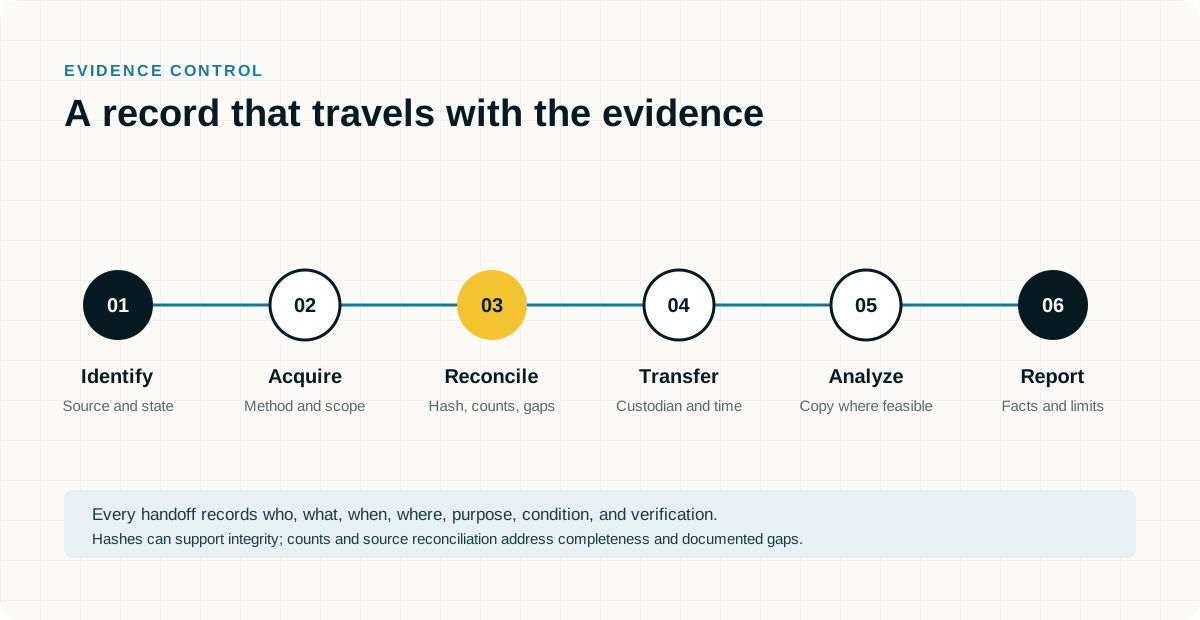
Assign evidence identifiers to acquired devices, exports and derived examination files. Record collection authority, collector, method, acquisition time, access history, transfer details and appropriate integrity checks. Keep native records, relevant metadata, reports from collection tools and known errors with the working file. Distinguish preserved originals from analyst notes, screenshots, reconstructed exhibits and later exports. That separation allows counsel and another examiner to understand what an exhibit actually represents.
For a potential temporary restraining order or other urgent application, ask counsel what propositions must be supported and when. Provide a concise factual chronology, a source index and the technical basis for each proposed statement, including material limits and alternative explanations. Counsel determines the legal standard, required filings and relief sought. Do not promise that file movement, a hash match or an examiner's report will establish misappropriation or secure an order.
11. Deliver Decisions and Next Steps Without Overstating the Record
The initial handoff should explain what was preserved, what remains at risk, which sources were actually examined and what the current observations support. Identify relevant data that is unavailable or outside the authorized scope. Assign each remaining task an owner and a reason, such as collecting a device, obtaining provider records, validating an export or resolving a permission question. Keep the original concern separate from the technical conclusion.
A limited triage engagement can establish priorities without answering every disputed issue. State whether the work is a preliminary assessment, a defined examination or an opinion prepared for testimony. If later records change the chronology or interpretation, retain the earlier version and explain the revision. That disciplined record is more useful than an early accusation the available evidence cannot sustain.
When to Escalate to a Specialist
Escalate before a device is reset, a phone is wiped, a source is about to expire or a departing account is deleted. Obtain specialist support where the matter involves competing ownership or privacy claims, encrypted devices, source code comparisons, uncertain attribution or an urgent expert deadline. Select a practitioner with relevant examination and testimony experience. Court qualification is specific to the assignment and proceeding, and no guide can guarantee an evidentiary ruling.
Call the New York desk at (212) 561-5860 or the 24/7 emergency hotline at (800) 868-8189 for a Rapid Case and Scope Assessment. GDF practitioners work alongside legal counsel, internal auditors and corporate IT security teams to identify urgent preservation needs, define the questions the evidence must answer and scope the engagement. Have the departure timeline, systems involved, equipment location and immediate deadline ready. Do not send source code, employee files or credentials through an ordinary contact message.
Information Gathering Q&A Checklist
Complete this record with counsel and the people who administer the systems. Identify what is known, what remains unknown and who can confirm each answer. Ownership, account registration, management enrollment and authority to collect are separate questions. Record the source of an answer and the date it was confirmed. Do not change a setting, sign out an account or test a recovery process merely to complete the checklist.
Do not write passwords, recovery keys, unlock codes or authentication secrets here. Record whether authorized access is available, who controls it and how a secure handoff can be arranged. Keep completed copies in the location counsel or the company approves. Do not send a completed record containing sensitive account or employee details through a public contact form.
- Who is directing the matter and who can authorize technical access?
Identify directing counsel, the business decision maker, the IT security owner and any outside administrator. Record the immediate deadline, relevant period and known preservation risk. An employee's possession of a device or an administrator's ability to access an account does not by itself settle the authorized examination scope.
Answer:
Owner, source, date and unresolved questions:
- Who provides the email service and who administers it?
Identify Microsoft 365, Google Workspace, an internal Exchange environment, a hosted service or a combination. Record the tenant or organization reference, relevant domains, mailbox owners, aliases, shared mailboxes and the MSP or administrator responsible. Identify available preservation and export permissions and any licensing question that needs confirmation.
Answer:
Owner, source, date and unresolved questions:
- Does the company have archiving, backups or preservation holds in place?
Name each service and distinguish an archive or journal from a backup, a retention policy and a matter specific hold. Identify what each covers, the available dates, deletion or rotation rules and who can export or restore records. Record whether preservation has actually been verified, rather than treating the existence of a subscription as proof of coverage.
Answer:
Owner, source, date and unresolved questions:
- Does the company supply the computers or do employees use their own?
Record company owned, personally owned, leased and shared equipment separately. Identify the assigned user, operating system, asset or serial reference and present location. Note any employee owned computer used for business and the applicable access agreement. Company ownership and permission to examine particular personal material should not be assumed to be the same.
Answer:
Owner, source, date and unresolved questions:
- Are mobile devices company owned, employee owned or a mixed arrangement?
Identify the phone or tablet, assigned user, model and operating system where known, and who currently holds it. Distinguish the owner of the handset from the owner of the cellular service account. Record whether work data is separated into a managed profile and whether a replacement, return or wipe is already scheduled.
Answer:
Owner, source, date and unresolved questions:
- Whose Apple, Google or Samsung account is registered or signed in on each phone?
Record each relevant account as personal, company controlled or unknown, and identify who can lawfully arrange access. For Apple devices, note any organization enrollment and known Activation Lock status separately from the signed in Apple Account. For Android devices, distinguish personal and work profiles and note relevant Google and Samsung accounts separately. Do not sign out or reset an account to answer this question. [S14] [S15]
Answer:
Owner, source, date and unresolved questions:
- Does the company use MDM and what does it actually manage on these devices?
Name the management service, administrator and enrollment mode, including supervision or work profile details where applicable. Record the last known device contact and any pending retire, lock or wipe command. A device appearing in a management console does not establish access to every personal application, message or backup. Preserve the management record without issuing a command merely to test capability.
Answer:
Owner, source, date and unresolved questions:
- Can the company recover the BitLocker or other encryption keys for each relevant computer?
Ask whether recovery material is actually available for the identified device and drive, where it is escrowed and who has authorized retrieval permission. Possible locations include Microsoft Entra ID, Active Directory or another approved store. Note FileVault or other encryption separately. Do not assume that MDM enrollment guarantees key availability, and do not place the key itself on this record. [S13]
Answer:
Owner, source, date and unresolved questions:
- Who controls identity, administrator access and multifactor authentication?
Identify the identity provider, relevant privileged accounts, outside administrator and person who can approve an export or collection. Note access dependencies such as an unavailable administrator or authentication device without recording secrets. Shared or delegated access should be identified because account activity may require additional evidence before it can be attributed to an individual.
Answer:
Owner, source, date and unresolved questions:
- Which cloud storage, collaboration and messaging services contain relevant work?
Identify shared drives, Teams, SharePoint, OneDrive, Slack, Google Chat and other platforms actually used for the relevant work. Note external ownership, linked documents, personal accounts used for business and any unsupported or unavailable source. A mailbox export should not be assumed to include the contents of every linked file or separate conversation.
Answer:
Owner, source, date and unresolved questions:
- What activity logs and endpoint records are available now?
Ask the responsible administrator which email, identity, endpoint, cloud sharing, USB, security and data protection records exist for the relevant period. Record actual date coverage, export permissions, known gaps and the next expiration or rotation point. Enabling a logging feature today should not be described as recovering activity that was never recorded.
Answer:
Owner, source, date and unresolved questions:
- What has already changed on the devices or accounts?
Record password resets, access restrictions, account deletions, mailbox conversions, software installations, cleanup activity, repairs, cloud sync changes and any device reset or wipe. Identify who acted, when and why. Include informal handling or earlier collections so the examiner can distinguish relevant historical activity from changes made during the response.
Answer:
Owner, source, date and unresolved questions:
- What is the departure timeline and when will normal offboarding change the record?
Record notice, last working day, last authorized access, equipment return and any scheduled reset, account deletion or reassignment. Identify who controls each scheduled action. Where access has already been restricted, retain the time and reason so the response itself can be separated from the activity under examination.
Answer:
Owner, source, date and unresolved questions:
- What specific information, code or business records are at issue?
Identify the actual projects, file locations, repositories, versions and access restrictions relevant to the concern. Record authorized sharing practices and known alternative sources such as common libraries or public code. Keep the reported concern separate from a technical finding or counsel's determination that particular material meets a legal definition.
Answer:
Owner, source, date and unresolved questions:
- Which devices and transfer paths should the examiner consider?
Record known removable media, corporate or personal cloud sync, external sharing links, email destinations, source code platforms and remote access tools that may be relevant. State the observation supporting each concern and any ordinary business explanation already known. Identify missing devices or unavailable destination records without assuming what their contents would show.
Answer:
Owner, source, date and unresolved questions:
- Who has the equipment now and how will it be handed over?
Identify the current holder, storage location and any earlier handling of each relevant device or removable medium. Note whether it is on, off, locked or already reset only if that state is known without interacting with it. Arrange a documented, secure transfer and a device specific preservation discussion before further handling.
Answer:
Owner, source, date and unresolved questions:
Primary sources and further reading
Prepared November 1, 2026. Sources explain the general framework; applicability, licenses, available records and legal requirements vary. This guide is technical preparation, not legal advice or an assurance of compliance or admissibility.
- S7: NIST SP 800 101 Revision 1, Guidelines on Mobile Device Forensics
- S8: NIST SP 800 86, Guide to Integrating Forensic Techniques into Incident Response
- S10: Microsoft description of Windows Event 6416
- S11: Microsoft definitions of audit log activities
- S12: GitHub guidance on reviewing organization audit records
- S13: Microsoft BitLocker recovery overview
- S14: Apple guidance on Activation Lock and device management
- S15: Android Enterprise guidance on work profiles